Overview
Phone numbers are essential for enabling your AI agent to make and receive calls. You can assign different numbers for various purposes, such as:- Inbound calls (customer calls your business)
- Outbound calls (agent initiates call campaigns or automations)
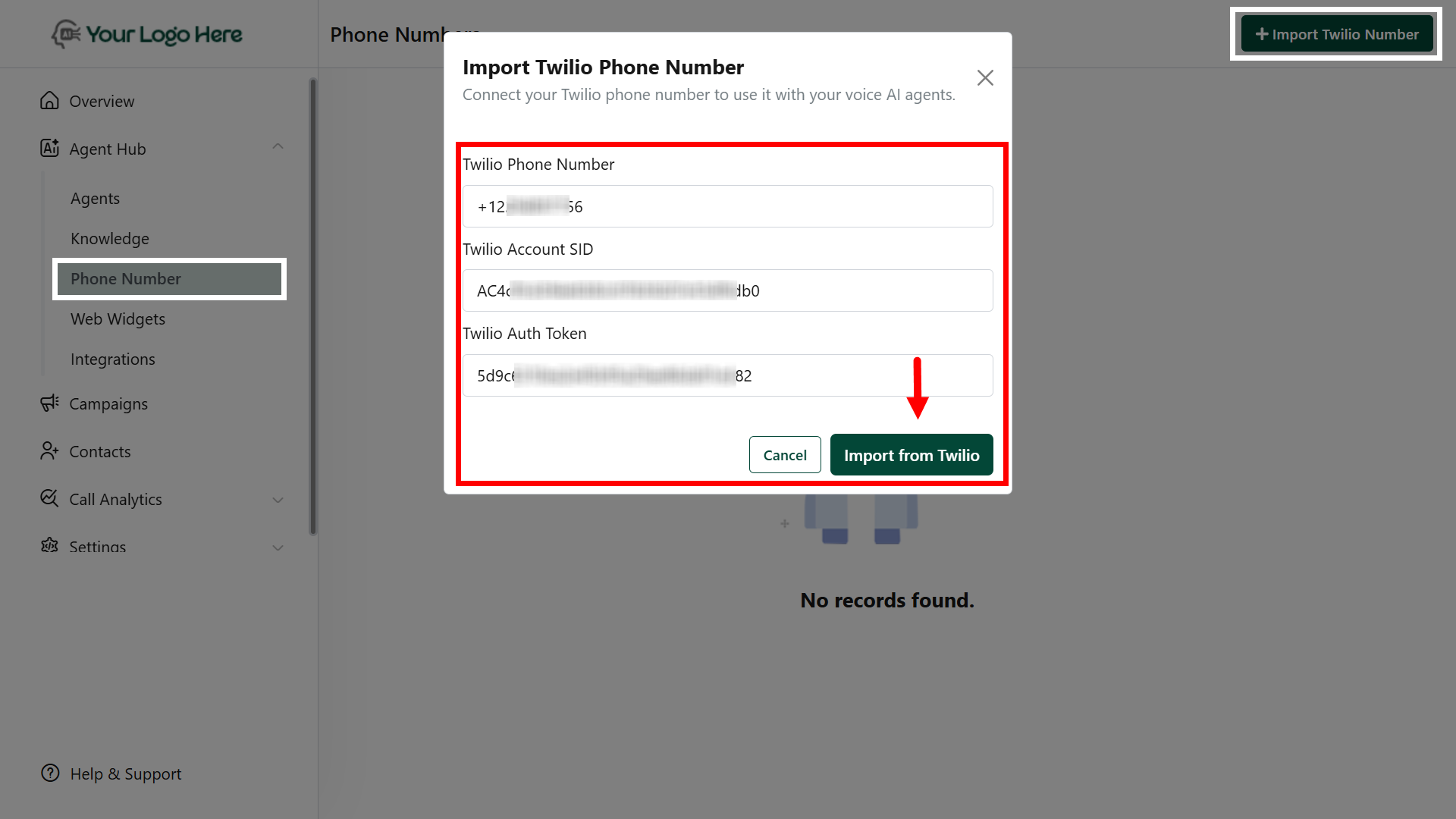
Import Twilio Phone Number
Connect your Twilio phone number to use it with your Voice AI agents. Steps to Import:- Log in to your Client Panel
Go to the Phone Numbers section. - Click “Import Twilio Number”
Start the process to link your Twilio account. - Enter Your Twilio Phone Number
Input the number in E.164 format, e.g.,+14155552671. - Enter Twilio Account SID
Find this in your Twilio Console; it always starts withAC…. - Enter Twilio Auth Token
You can locate this under Account → Settings in your Twilio Console. - Save and Verify
Click Save to complete the import. Test the number to ensure it’s correctly linked to your Voice AI agents.
Duplicate or already-linked numbers cannot be imported again.
Best Practices
- Use separate numbers for inbound and outbound agents for better tracking.
- Assign the imported number in the Agent > Deploy tab.
- Make sure your agent is properly configured before assigning a phone number.