> ## Documentation Index
> Fetch the complete documentation index at: https://docs.voicemetrics.ai/llms.txt
> Use this file to discover all available pages before exploring further.
# Outbound Campaigns
> An Outbound Call Campaign works like a bulk email campaign — but with real-time voice conversations powered by AI. Use it to engage, qualify, and convert large volumes of contacts at scale, automatically.
## **How It Works**
* Import Contacts or sync from your CRM
* Organize contacts into **Lists** or apply **Tags**
1. Before starting a campaign, make sure to **import your phone number from Twilio**
2. Verify it’s **active** for outbound calls.
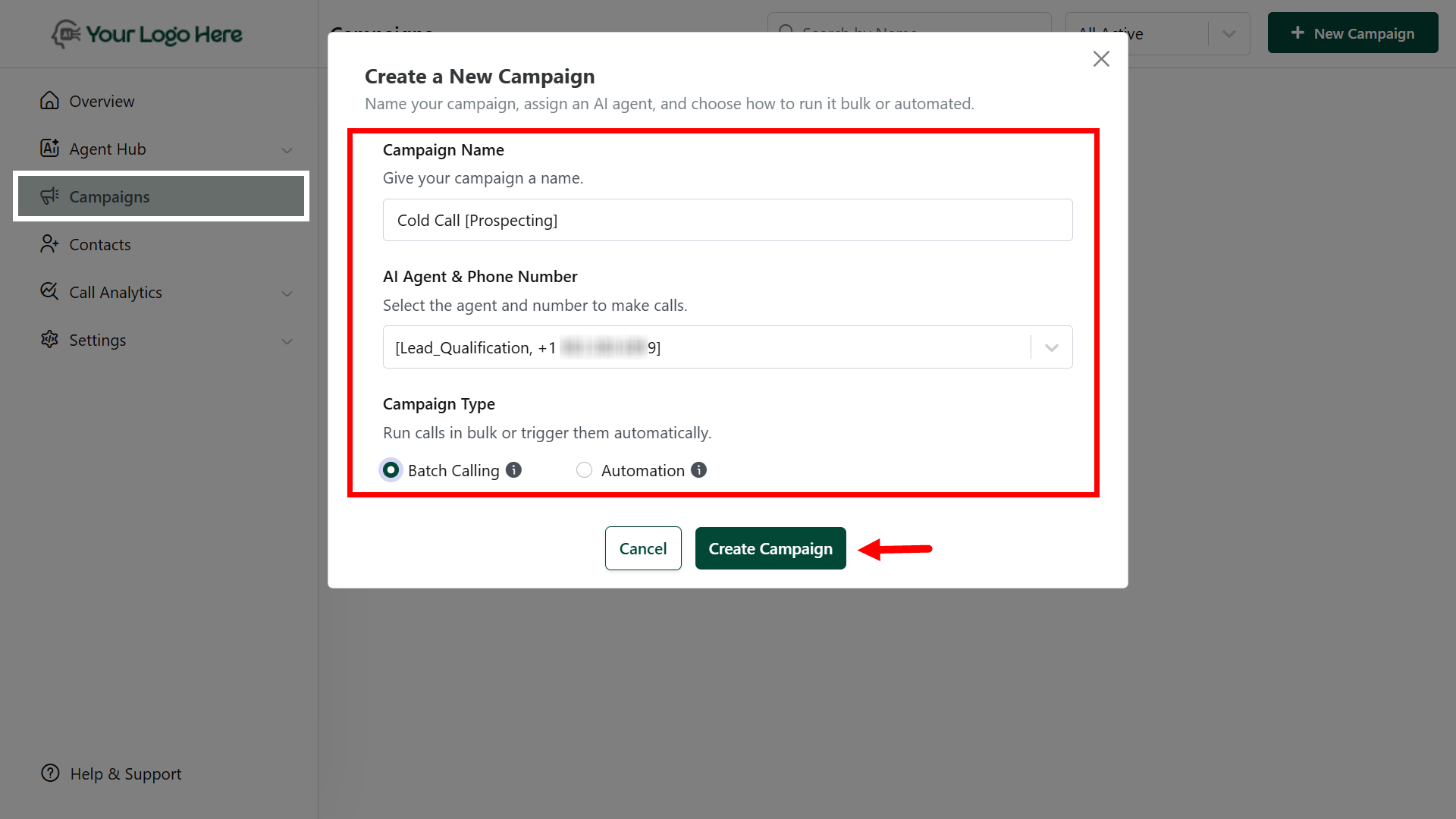
* Go to **Campaigns** and click **New Campaign**
* Set:
* **Campaign Name**
* **Assign AI Agent** & **Phone Number**
* Campaign Type as **"Batch Calling"**
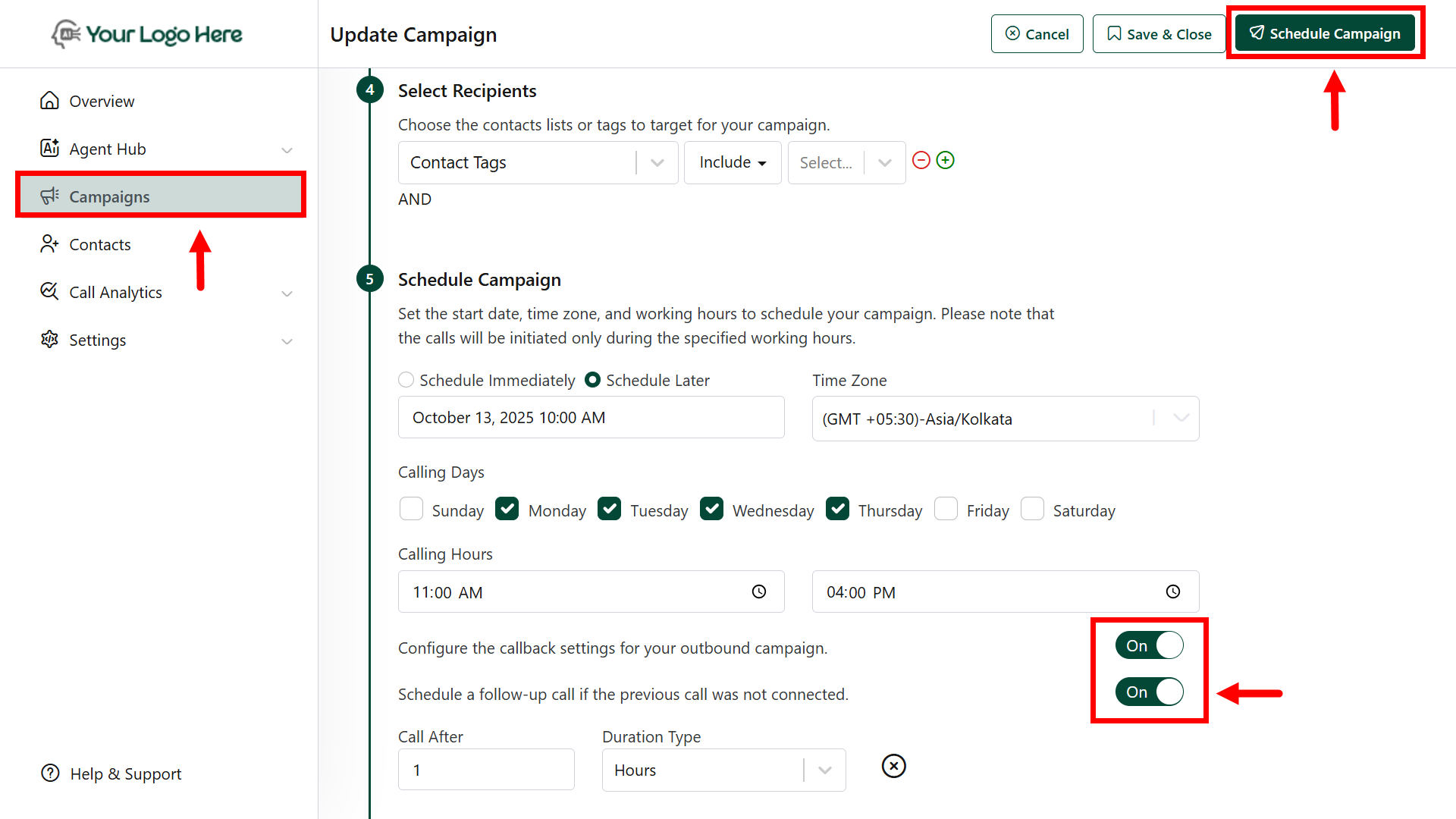
 * Choose your contact **list** and **tags** with multiple conditions.
* Schedule your preferred **Date/time** to launch this campaign.
* **Auto Redial Rules** for unanswered calls (e.g., retry after 15 mins, 4 hrs, next day)
* **Enable scheduling a follow-up call.** If the previous call was not connected.
* Your AI agent will call each contact, ask predefined questions, and **take actions**
* Extract key contact info using **#Extract\_Info**
* Book appointments with **#Book\_Calendar**
* Push contact data to**CRM** or Sheets using **#Post\_Call\_Event**
* Full call log, summary, and transcript saved under **Call History.**
* Choose your contact **list** and **tags** with multiple conditions.
* Schedule your preferred **Date/time** to launch this campaign.
* **Auto Redial Rules** for unanswered calls (e.g., retry after 15 mins, 4 hrs, next day)
* **Enable scheduling a follow-up call.** If the previous call was not connected.
* Your AI agent will call each contact, ask predefined questions, and **take actions**
* Extract key contact info using **#Extract\_Info**
* Book appointments with **#Book\_Calendar**
* Push contact data to**CRM** or Sheets using **#Post\_Call\_Event**
* Full call log, summary, and transcript saved under **Call History.**
 ## **Features**
* Target specific lead lists or tags
* Use custom agents with tailored prompts
* Assign dedicated outbound numbers
* Schedule campaigns in advance
* Auto redial settings to maximize answer rates
* Track performance via call analytics and conversion reports
## **Popular Use Cases**
1. **Cold Outreach**
* Call purchased or collected cold contacts to introduce your product/service and qualify interest.
2. **Contact Reactivation**
* Engage cold or inactive contacts from your client’s CRM with reactivation scripts.
3. **New Contact Follow-Up**
* Automatically call new contacts within minutes of form submissions or ad conversions.
4. **Webinar / Event Reminders**
* Send voice reminders before webinars, demos, or workshops and allow users to confirm or reschedule via the call.
5. **Missed Appointment Follow-Ups**
* Call no-shows to offer rescheduling and gather feedback for future engagement.
6. **Limited-Time Offer Campaigns**
* Promote short-term discounts or seasonal offers and drive quick conversions.
7. **Service Renewal / Upgrade Calls**
* Call existing customers about subscription renewals or upsell opportunities.
8. **Feedback Collection**
* Collect NPS or service feedback after a purchase or a completed service.
**Important**
Phone numbers must be imported from **Twilio**
Use compliant call timings and respect DND regulations
Combine with webhook integrations for deeper CRM sync and workflow automation
## **Features**
* Target specific lead lists or tags
* Use custom agents with tailored prompts
* Assign dedicated outbound numbers
* Schedule campaigns in advance
* Auto redial settings to maximize answer rates
* Track performance via call analytics and conversion reports
## **Popular Use Cases**
1. **Cold Outreach**
* Call purchased or collected cold contacts to introduce your product/service and qualify interest.
2. **Contact Reactivation**
* Engage cold or inactive contacts from your client’s CRM with reactivation scripts.
3. **New Contact Follow-Up**
* Automatically call new contacts within minutes of form submissions or ad conversions.
4. **Webinar / Event Reminders**
* Send voice reminders before webinars, demos, or workshops and allow users to confirm or reschedule via the call.
5. **Missed Appointment Follow-Ups**
* Call no-shows to offer rescheduling and gather feedback for future engagement.
6. **Limited-Time Offer Campaigns**
* Promote short-term discounts or seasonal offers and drive quick conversions.
7. **Service Renewal / Upgrade Calls**
* Call existing customers about subscription renewals or upsell opportunities.
8. **Feedback Collection**
* Collect NPS or service feedback after a purchase or a completed service.
**Important**
Phone numbers must be imported from **Twilio**
Use compliant call timings and respect DND regulations
Combine with webhook integrations for deeper CRM sync and workflow automation