> ## Documentation Index
> Fetch the complete documentation index at: https://docs.voicemetrics.ai/llms.txt
> Use this file to discover all available pages before exploring further.
# Outbound Automation
> Outbound Call Automation is similar to building an ActiveCampaign-style workflow — but for voice calls. It allows you to trigger AI-powered calls based on real-time events, such as new contact creation, lead updates, or other webhook-based triggers from CRMs or apps. This lets you automate follow-ups and outreach instantly without scheduling a campaign manually.
## **How It Works**
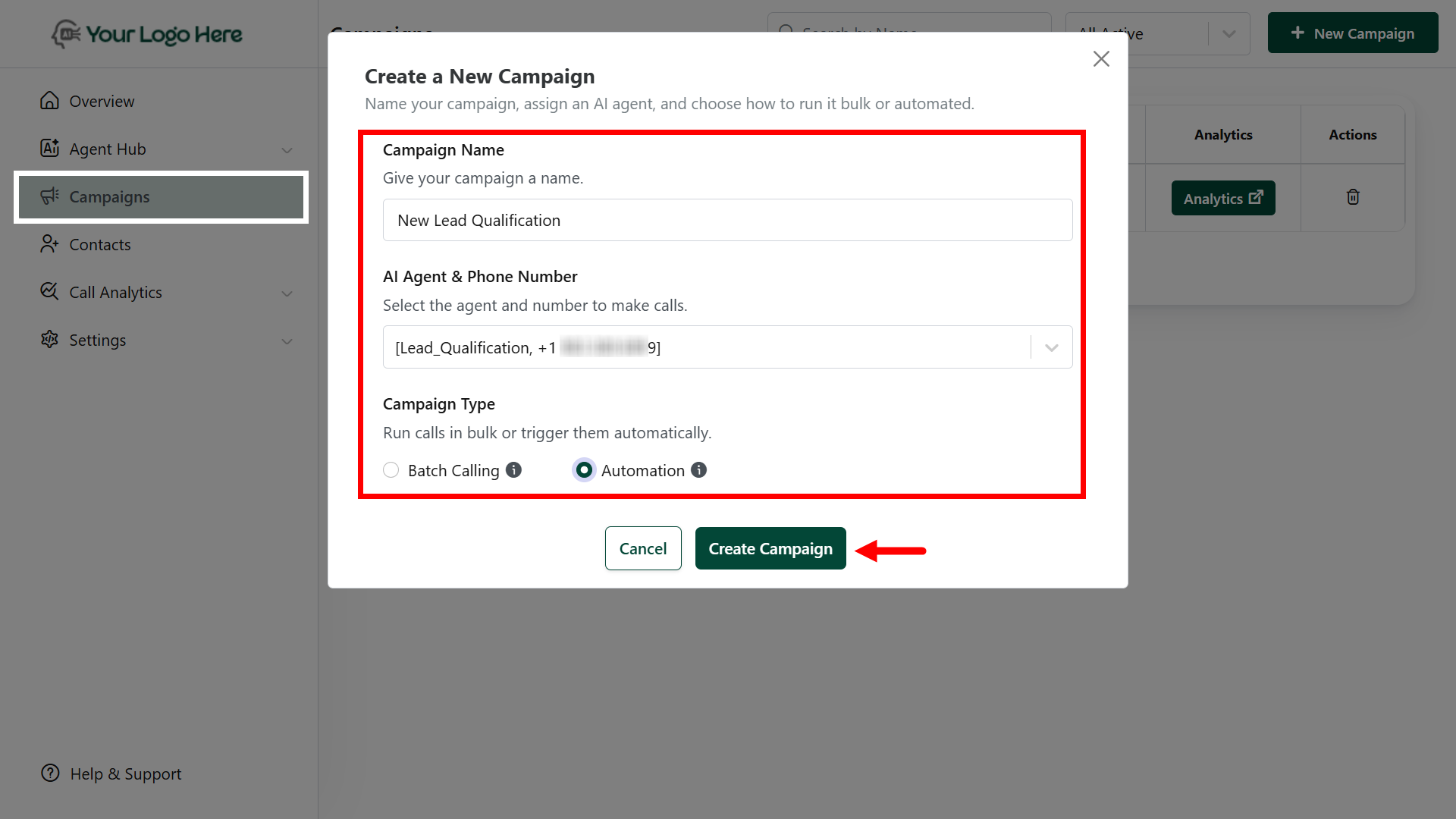
* Go to Campaigns > **New Campaign**
* Give your **Campaign name** for easy identification (e.g., “New Facebook Contact Qualification").
* Choose **Outbound AI Agent Number**
* Select Campaign type as "**Automation**".
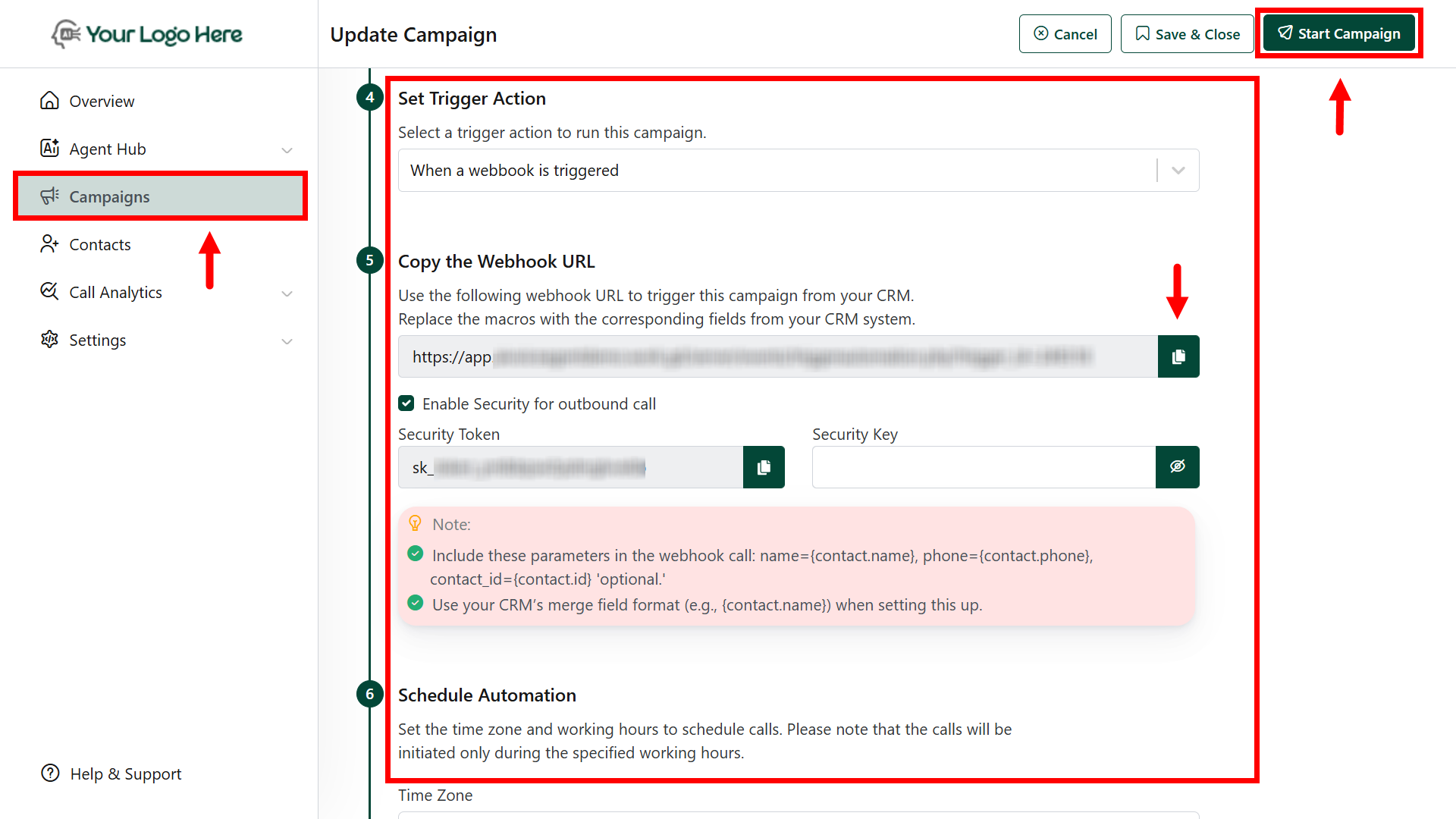
 Select which event will start the call automation:
* When a **Contact is Created**
* When a **Contact is Updated**
* When a **Contact is Created or Updated**
* When a\*\*Webhook is triggered \*\* (Allows your AI agent to call new contacts in GHL)
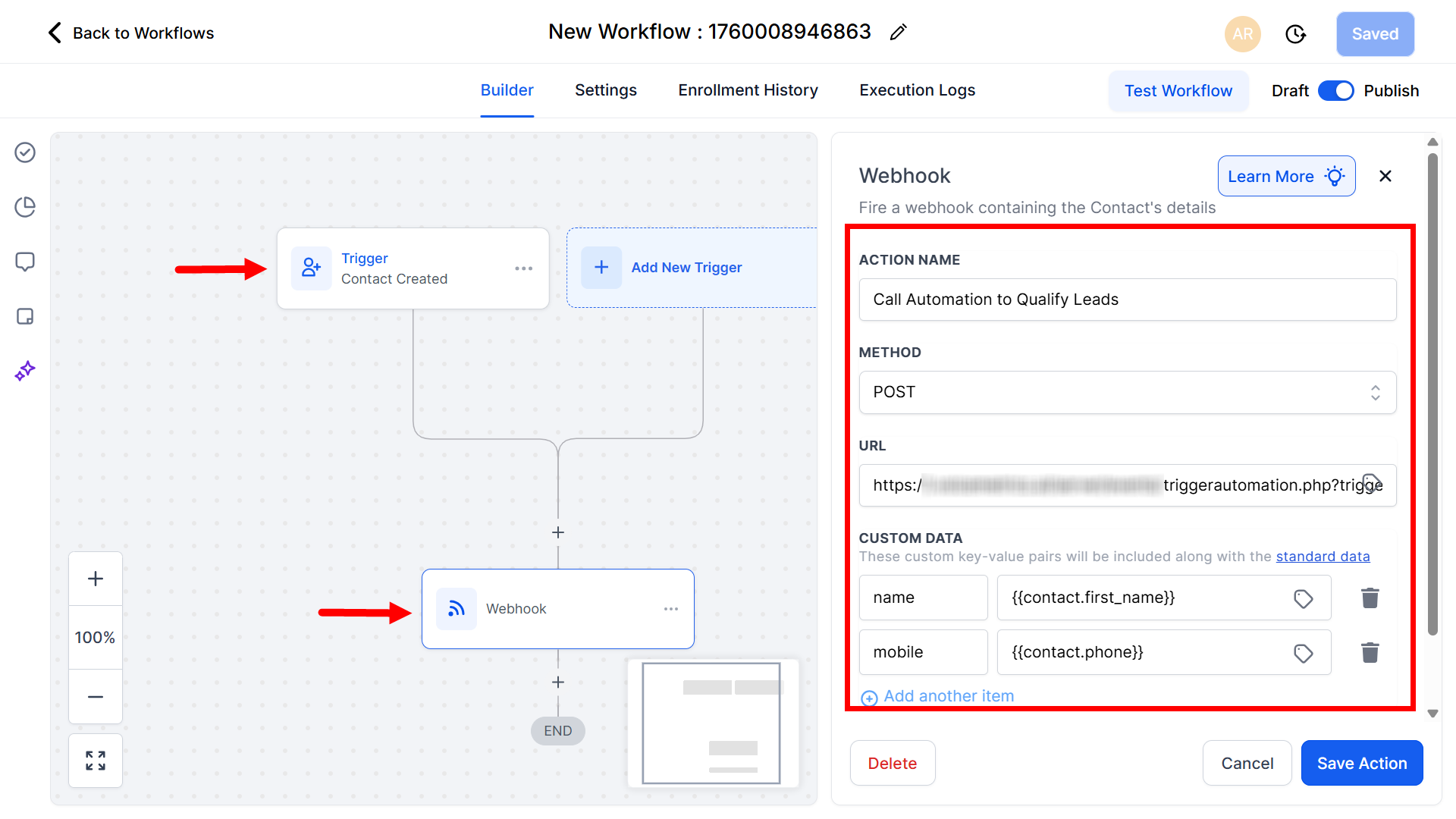
* Use the following webhook URL to trigger this automation from your CRM.\
Replace the macros with the **corresponding fields** from your CRM system.
* Go to GHL CRM > **Sub Account** > **Automations > Create Workflow**
* Create a Trigger and paste the Webhook URL under **Actions**
* This helps target only new contacts, irrespective of the list and tags.
Select which event will start the call automation:
* When a **Contact is Created**
* When a **Contact is Updated**
* When a **Contact is Created or Updated**
* When a\*\*Webhook is triggered \*\* (Allows your AI agent to call new contacts in GHL)
* Use the following webhook URL to trigger this automation from your CRM.\
Replace the macros with the **corresponding fields** from your CRM system.
* Go to GHL CRM > **Sub Account** > **Automations > Create Workflow**
* Create a Trigger and paste the Webhook URL under **Actions**
* This helps target only new contacts, irrespective of the list and tags.
 * Define business hours to avoid calling outside working hours (e.g., 10 AM – 6 PM)
If a call fails or goes unanswered:
* Retry after 15 minutes (1st attempt)
* Retry after 4 hours (2nd attempt)
* Retry next day (3rd attempt)
* AI validates the conversation
* Uses **#Extract\_Info** to capture lead data (name, email, intent, etc.)
* Uses **#Book\_Calendar** to schedule appointments
* Sends call data to CRM or Google Sheets via **#Post\_Call\_Event** webhook
* View full call logs and transcripts in **Call History**
* Define business hours to avoid calling outside working hours (e.g., 10 AM – 6 PM)
If a call fails or goes unanswered:
* Retry after 15 minutes (1st attempt)
* Retry after 4 hours (2nd attempt)
* Retry next day (3rd attempt)
* AI validates the conversation
* Uses **#Extract\_Info** to capture lead data (name, email, intent, etc.)
* Uses **#Book\_Calendar** to schedule appointments
* Sends call data to CRM or Google Sheets via **#Post\_Call\_Event** webhook
* View full call logs and transcripts in **Call History**
 ## **Use Case Examples**
* **Instant Lead Follow-Up**\
Trigger a call when a lead fills out a form or subscribes via a landing page.
* **CRM Lead Re-Engagement**\
Call warm or reactivated leads as soon as their status changes.
* **Tag-Based Triggering**\
Auto-call when a lead gets tagged as “Hot,” “Schedule Call,” or “Demo Booked.”
* **Appointment Reminder Calls**\
Trigger calls 1 hour before a scheduled appointment to reduce no-shows.
* **Missed Payment or Renewal Alert**\
Automatically notify users when their subscription is about to expire.
## **Integrations**
Use this with:
* **CRMs** like HubSpot, Zoho, and GoHighLevel
* **Forms & Lead Sources** like Facebook Ads, Google Ads, Typeform
* **Automation Tools** like Zapier, [Make.com](http://Make.com), N8N
* **Spreadsheets** like Google Sheets or Excel
Trigger via **Webhook** for full automation flow.
**Important:**
* Phone numbers must be imported from **Twilio**
* Ensure agents are configured with the appropriate prompt and actions
* Respect DND guidelines and legal calling hours in your region
* Combine with **Call Analytics** to track conversion rates
## **Use Case Examples**
* **Instant Lead Follow-Up**\
Trigger a call when a lead fills out a form or subscribes via a landing page.
* **CRM Lead Re-Engagement**\
Call warm or reactivated leads as soon as their status changes.
* **Tag-Based Triggering**\
Auto-call when a lead gets tagged as “Hot,” “Schedule Call,” or “Demo Booked.”
* **Appointment Reminder Calls**\
Trigger calls 1 hour before a scheduled appointment to reduce no-shows.
* **Missed Payment or Renewal Alert**\
Automatically notify users when their subscription is about to expire.
## **Integrations**
Use this with:
* **CRMs** like HubSpot, Zoho, and GoHighLevel
* **Forms & Lead Sources** like Facebook Ads, Google Ads, Typeform
* **Automation Tools** like Zapier, [Make.com](http://Make.com), N8N
* **Spreadsheets** like Google Sheets or Excel
Trigger via **Webhook** for full automation flow.
**Important:**
* Phone numbers must be imported from **Twilio**
* Ensure agents are configured with the appropriate prompt and actions
* Respect DND guidelines and legal calling hours in your region
* Combine with **Call Analytics** to track conversion rates