> ## Documentation Index
> Fetch the complete documentation index at: https://docs.voicemetrics.ai/llms.txt
> Use this file to discover all available pages before exploring further.
# Extract Call Info
> The Extract Info action allows your voice agent to capture and store key details shared by the caller during a conversation. This is useful for collecting structured data like names, contact details, booking info, or custom lead qualifications—automatically and accurately.
## **How It Works**
1. The agent interacts with the caller during the conversation.
2. The **Extract Info** action identifies and extracts predefined data points.
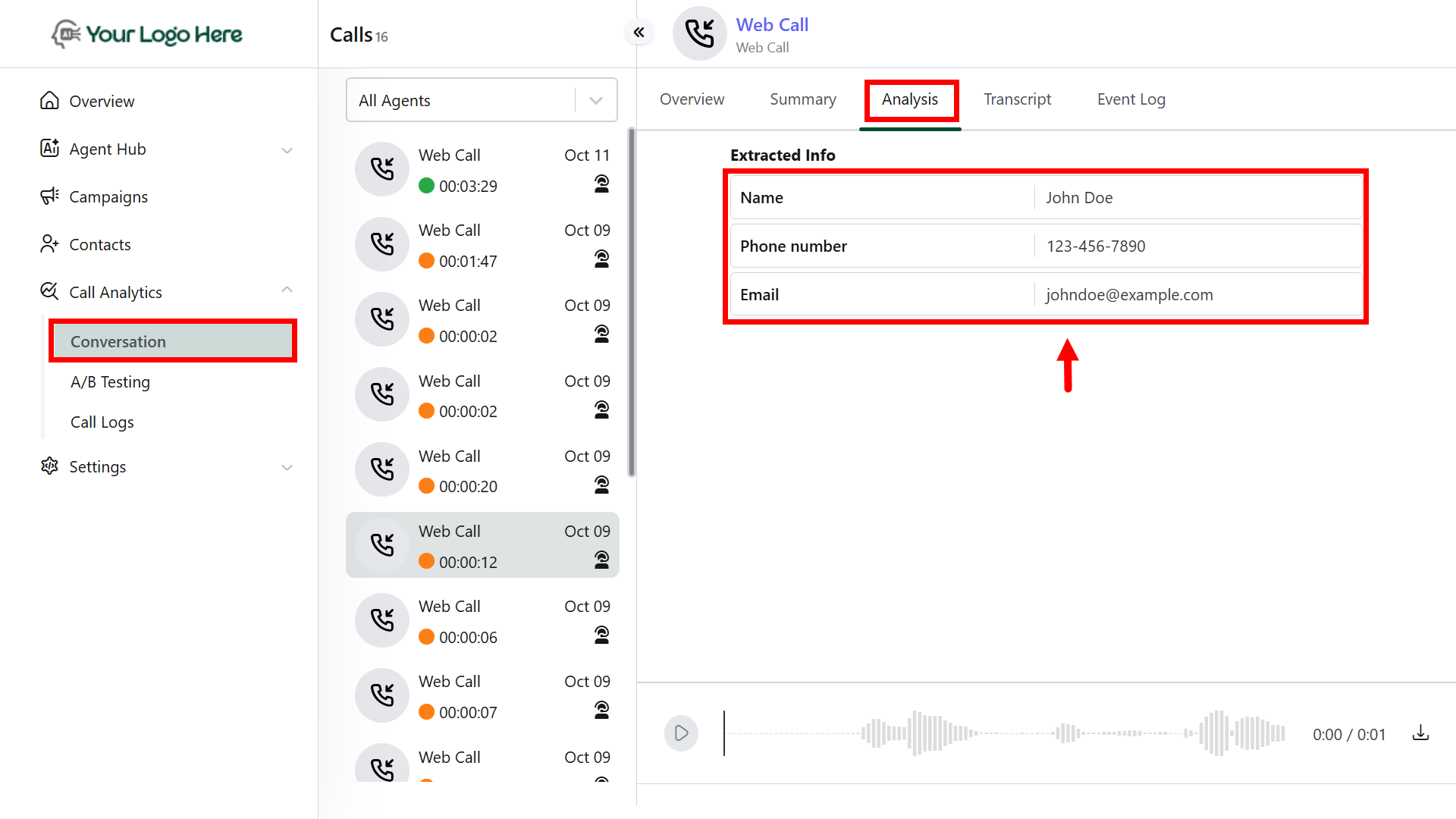
3. Extracted data is stored in the **Conversation** future reference.
4. Data can be forwarded to external tools (like CRMs, Sheets) using the **#Post\_Call\_Event** action.
## **What You Can Extract**
You can extract one or more of the following from a single call:
* Name
* Phone Number
* Email Address
* Interest Level
* Booking Date / Time
* Call Rating
* Any custom field relevant to your workflow
Extracted values are tagged and stored automatically. **No need for manual input.**
 ## **Setup Instructions**
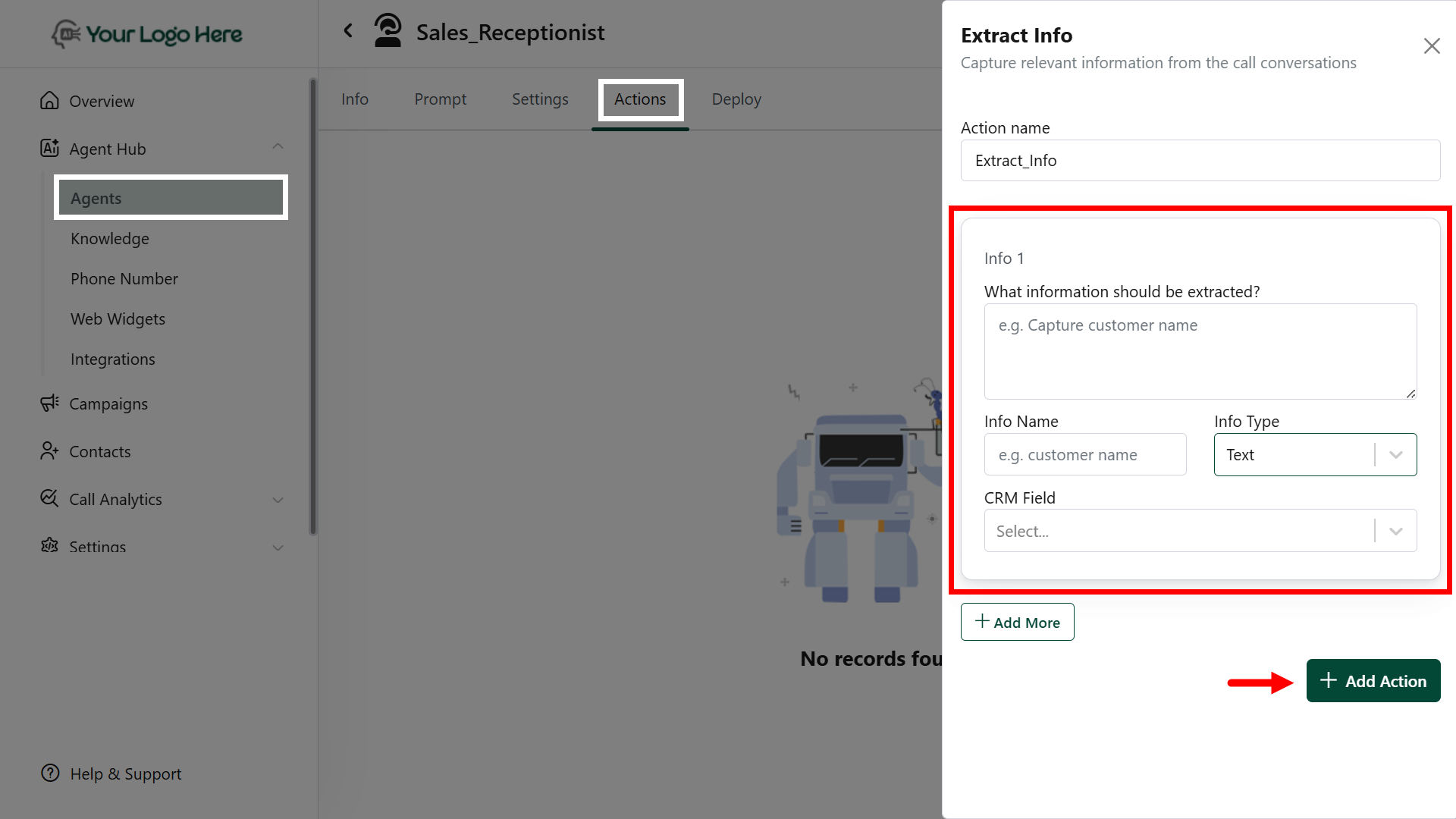
1. Navigate to **Actions** → Select **Extract Info**.
2. **Define the fields** you want to extract from the conversation:\
**Example:**
* **What information should be extracted?**\
*Describe the data you want to capture from the call.*\
*e.g., Capture the caller's name from the conversation*
* **Info Name**\
*Provide a title for the field*\
*e.g. Name*
* **Info Type**\
*Select the type of data to extract:*\
*e.g. Text*
3. Click **Add Action** to complete the action setup.
## **Setup Instructions**
1. Navigate to **Actions** → Select **Extract Info**.
2. **Define the fields** you want to extract from the conversation:\
**Example:**
* **What information should be extracted?**\
*Describe the data you want to capture from the call.*\
*e.g., Capture the caller's name from the conversation*
* **Info Name**\
*Provide a title for the field*\
*e.g. Name*
* **Info Type**\
*Select the type of data to extract:*\
*e.g. Text*
3. Click **Add Action** to complete the action setup.
 ## **Sending Data to Other Tools**
After data is extracted, use the #Post\_Call\_Event action to push this info to:
* CRM systems
* Google Sheets
* Webhooks or APIs
* Marketing tools
## **Best Practices**
* Clearly define what data to extract.
* Combine with #Post\_Call\_Event to create seamless workflows.
* Test with sample calls to validate the accuracy of extraction.
## **Sending Data to Other Tools**
After data is extracted, use the #Post\_Call\_Event action to push this info to:
* CRM systems
* Google Sheets
* Webhooks or APIs
* Marketing tools
## **Best Practices**
* Clearly define what data to extract.
* Combine with #Post\_Call\_Event to create seamless workflows.
* Test with sample calls to validate the accuracy of extraction.