> ## Documentation Index
> Fetch the complete documentation index at: https://docs.voicemetrics.ai/llms.txt
> Use this file to discover all available pages before exploring further.
# Client Subscription
> This guide explains how clients subscribe to a plan and continue using the platform after their trial ends. It covers trial access, plan details, billing flow, minute usage, and how agencies profit.
## **Free Trial Access**
* Clients can explore the platform **without payment**, adding **card details** or a **subscription**.
* Enable Re-billing, then enable trial period and free minutes.
* After the trial ends, Clients must subscribe to a plan to keep using the platform.
The default is 7 days (can be customized).
* The default is 30 mins (can be customised).
Learn more about [How To Enable Re-Billing](https://docs.voicemetrics.ai/Rebilling/enablerebilling)
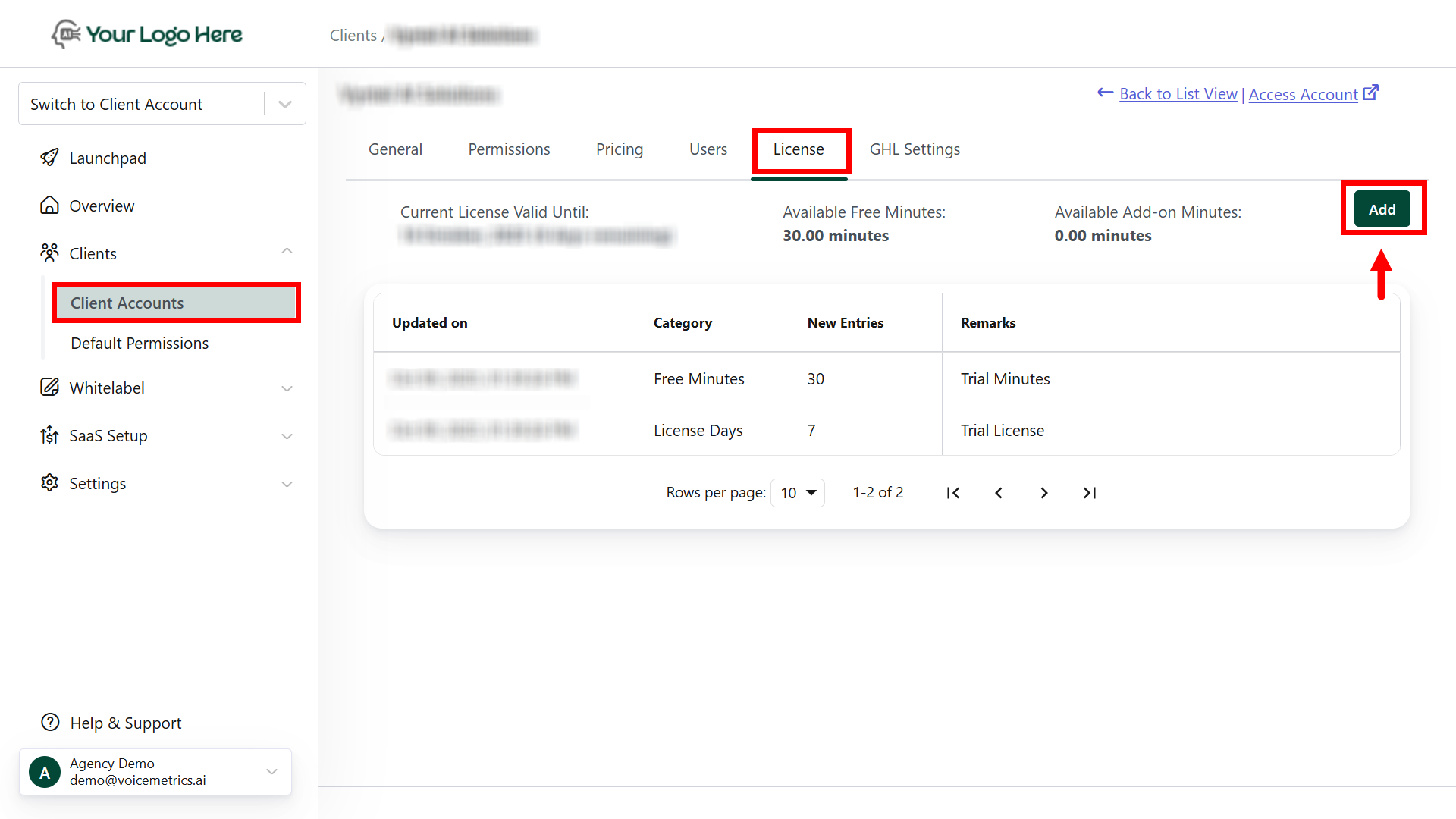
## \*\*Steps to Enable License \*\*
* Go to Client Accounts and tap on the targeted Client
* Navigate to the "**License**" tab
* Tap \*\*"Add" \*\*and enter **License Type**
* Add \*\*New Addition \*\*(Day count), remarks (reference), and **Save.**
 ## **Subscribing to a Plan**
Once the trial ends, the client is prompted to choose a subscription plan
* Choose between **monthly** or **yearly** options.
* Each plan includes:
* **Plan Charges**
* **Free Call Minutes**
* **Post-Free Minute Rate** (charged per additional minute)
* Clients can also choose how to refill their wallet for additional usage.
## **Example Plans:**
* \$299/month
* Includes 300 free minutes
* Additional minutes charged at \$0.48/min
* \$699/month
* Includes 1,000 free minutes
* Additional minutes charged at \$0.28/min
**Keep 100% of the Profits**
All client subscription and add-on payments are made directly to your connected **Stripe account**.
## **Refill Add-On Minutes (Auto Refill)**
When free minutes run out, clients can continue usage through **add-on minutes**.
* Clients select a refill amount (e.g., 100 / 500 / 1,000 minutes).
* The refill is stored in a wallet and used automatically once free minutes are exhausted.
**Auto Refill:**
* When the wallet balance drops below **10%** of the last refill amount, the system **auto-refills**.
* Ensures uninterrupted service with no manual top-ups.
* The auto-refill amount is billed directly from the client’s saved card.
**Minute Usage Flow**
1. The platform first uses the **free minutes** from the active subscription plan.
2. After free minutes:
* Minutes are consumed from the **Add-On Wallet**.
* If the wallet is low, **auto-refill** activates based on settings.
Clients can monitor everything inside their **Billing Dashboard**.
## **Summary**
* Clients begin with a **free trial**, limited in time and minutes.
* After the trial, they must **subscribe to a plan**.
**Plans offer:**
* Free monthly minutes
* Per-minute rates after usage
* Auto-refill to avoid downtime
* **Add-on wallets** are billed automatically to keep campaigns running.Transparent billing and simple controls for both agency and client.
* Agencies retain **100% of all payments**, directly via **Stripe**.
* Transparent billing and simple controls for both agency and client.
* Your clients can download invoices within their app.
## **Subscribing to a Plan**
Once the trial ends, the client is prompted to choose a subscription plan
* Choose between **monthly** or **yearly** options.
* Each plan includes:
* **Plan Charges**
* **Free Call Minutes**
* **Post-Free Minute Rate** (charged per additional minute)
* Clients can also choose how to refill their wallet for additional usage.
## **Example Plans:**
* \$299/month
* Includes 300 free minutes
* Additional minutes charged at \$0.48/min
* \$699/month
* Includes 1,000 free minutes
* Additional minutes charged at \$0.28/min
**Keep 100% of the Profits**
All client subscription and add-on payments are made directly to your connected **Stripe account**.
## **Refill Add-On Minutes (Auto Refill)**
When free minutes run out, clients can continue usage through **add-on minutes**.
* Clients select a refill amount (e.g., 100 / 500 / 1,000 minutes).
* The refill is stored in a wallet and used automatically once free minutes are exhausted.
**Auto Refill:**
* When the wallet balance drops below **10%** of the last refill amount, the system **auto-refills**.
* Ensures uninterrupted service with no manual top-ups.
* The auto-refill amount is billed directly from the client’s saved card.
**Minute Usage Flow**
1. The platform first uses the **free minutes** from the active subscription plan.
2. After free minutes:
* Minutes are consumed from the **Add-On Wallet**.
* If the wallet is low, **auto-refill** activates based on settings.
Clients can monitor everything inside their **Billing Dashboard**.
## **Summary**
* Clients begin with a **free trial**, limited in time and minutes.
* After the trial, they must **subscribe to a plan**.
**Plans offer:**
* Free monthly minutes
* Per-minute rates after usage
* Auto-refill to avoid downtime
* **Add-on wallets** are billed automatically to keep campaigns running.Transparent billing and simple controls for both agency and client.
* Agencies retain **100% of all payments**, directly via **Stripe**.
* Transparent billing and simple controls for both agency and client.
* Your clients can download invoices within their app.